

- Descrição curta
- Transform your forum's avatar selection with Avatar Gallery, a dynamic zero-configuration gallery that automatically organizes images into native tabs for seamless integration and performance. Perfect for XenForo users. Easy installation and caching ensures no server load impact. Download curated collections or customize folders directly in the admin panel.
Transform your forum's avatar selection with a dynamic, zero-configuration gallery.
Avatar Gallery automatically scans your server directories to present users with a curated collection of avatars, organized neatly into native tabs.
Features
Dynamic Discovery: Simply drag and drop images into folders. No manual database entries or complex admin panels required.
Native Organization: Avatar Gallery uses directory names to automatically generate tabs.
Images in the root folder → Default tab.
Images in Zombies/ → Zombies tab.
Images in Retro/ → Retro tab.
Style Adaptive: Built with XenForo's native style properties, ensuring perfect integration with any light or dark theme out of the box.
Performance First:
Caching: Directory scans are cached for 1 hour to ensure zero impact on server load.
Lazy Loading: All gallery images utilize native lazy loading for instant page rendering.
Seamless UX: Integrated directly into the native Avatar settings page.
Installation
Upload the Add-on
Upload the contents of the upload directory to your XenForo root.
Install
Log in to your Admin Control Panel.
Go to Add-ons and click Install for AvatarGallery.
Populate Your Gallery
Navigate to data/gallery_avatars/Global/ on your server.
Upload your avatar images (JPG, PNG, GIF, WEBP).
(Optional) Create folders like Heroes, Villains to automatically categorize them into tabs.
Download Avatar Collections
We've curated a high-quality collection of avatars to get you started.
Download: Get the full collection from our GitHub Repository.
Upload: Extract the ZIP and upload the folders (e.g., Character, GTA, PixelArt) into your data/gallery_avatars/Global/ directory.
Enjoy: The new tabs will automatically appear in your gallery!
FAQ
Q: How do I rename a tab?
A: Simply rename the folder in data/gallery_avatars/Global/. The tab name reflects the folder name (e.g. premium_icons becomes "Premium_icons").
Q: I added images but they aren't showing up?
A: The file list is cached for performance. You can clear the cache or simply wait up to 1 hour for changes to reflect.
Q: Does this replace custom uploads?
A: No. Users can still upload their own avatars as normal. This provides an additional, curated choice.
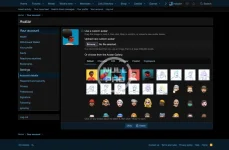
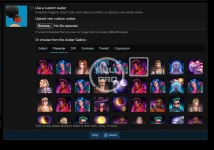
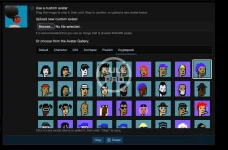
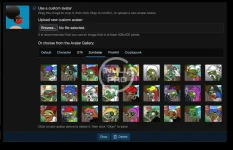
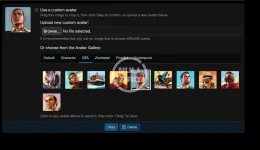
Avatar Gallery automatically scans your server directories to present users with a curated collection of avatars, organized neatly into native tabs.
Features
Dynamic Discovery: Simply drag and drop images into folders. No manual database entries or complex admin panels required.
Native Organization: Avatar Gallery uses directory names to automatically generate tabs.
Images in the root folder → Default tab.
Images in Zombies/ → Zombies tab.
Images in Retro/ → Retro tab.
Style Adaptive: Built with XenForo's native style properties, ensuring perfect integration with any light or dark theme out of the box.
Performance First:
Caching: Directory scans are cached for 1 hour to ensure zero impact on server load.
Lazy Loading: All gallery images utilize native lazy loading for instant page rendering.
Seamless UX: Integrated directly into the native Avatar settings page.
Installation
Upload the Add-on
Upload the contents of the upload directory to your XenForo root.
Install
Log in to your Admin Control Panel.
Go to Add-ons and click Install for AvatarGallery.
Populate Your Gallery
Navigate to data/gallery_avatars/Global/ on your server.
Upload your avatar images (JPG, PNG, GIF, WEBP).
(Optional) Create folders like Heroes, Villains to automatically categorize them into tabs.
Download Avatar Collections
We've curated a high-quality collection of avatars to get you started.
Download: Get the full collection from our GitHub Repository.
Upload: Extract the ZIP and upload the folders (e.g., Character, GTA, PixelArt) into your data/gallery_avatars/Global/ directory.
Enjoy: The new tabs will automatically appear in your gallery!
FAQ
Q: How do I rename a tab?
A: Simply rename the folder in data/gallery_avatars/Global/. The tab name reflects the folder name (e.g. premium_icons becomes "Premium_icons").
Q: I added images but they aren't showing up?
A: The file list is cached for performance. You can clear the cache or simply wait up to 1 hour for changes to reflect.
Q: Does this replace custom uploads?
A: No. Users can still upload their own avatars as normal. This provides an additional, curated choice.
![[Ap Yazılım] Scroll Buttons](/data/resource_icons/27/27701.jpg?1777685967)


![[Xen-Soluce] Avatar Gallery](/data/resource_icons/0/205.jpg?1724818358)
![[OzzModz] Avatar Gallery](/data/resource_icons/4/4318.jpg?1720149256)
![[AndyB] Avatar manager](/data/resource_icons/24/24138.jpg?1742296706)