
![[.🇨🇺] Post Color Highlighting](/data/resource_icons/11/11945.jpg?1720149296)
- Descrição curta
- Create a template xfposthighligh and copy Invision Community feature code. Edit Xenforo's postmacros to add adminhighlight styling in extra.less for custom forum highlights. Customize with [data-container-key="node-X"] for specific forums.
One day I was checking the Invision Community website and I came across this feature, so I set out to replicate it for Xenforo.
Step number 1:
We create a template called xf_post_highligh and copy the following code:
Setp number 2:
go to the template post_macros and edit the following line:
then add to extra.less :
Result:
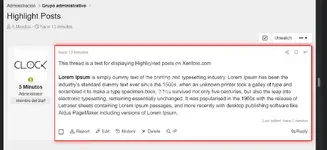
If you only want to display the highlight in only one forum you can use this code in extra.less
Step number 1:
We create a template called xf_post_highligh and copy the following code:
PHP:
One day I was checking the Invision Community website and I came across this feature, so I set out to replicate it for Xenforo.
Step number 1:
We create a template called xf_post_highligh and copy the following code:go to the template post_macros and edit the following line:
HTML:
<div class="message-cell message-cell--main">then add to extra.less :
CSS:
.admin_highlight {
border: 2px solid red;
box-shadow: 0 0 10px red;
}
Result:
If you only want to display the highlight in only one forum you can use this code in extra.less
CSS:
[data-container-key="node-X"]
{
.admin_highlight {
border: 2px solid red;
box-shadow: 0 0 10px red;
}
    }


![[cXF] Sticky Postbit](/data/resource_icons/22/22204.jpg?1728011273)