

- Compatibilidade com XF
- 2.3.x
- Descrição curta
- Enhance your XenForo forum with CinVin Style Tweaks, including customizing "What's New" link, adding a back icon for mobile users, adjusting Twitter Card meta tags, and using post attachments or calculated cover images as OG:image. Optimize your social media presence and improve user experience.
This is a collection of several options related to XenForo meta tags and miscellaneous display tweaks. This is how, for example, we are using attachments for the og:image at Cameraderie photography forum.
After installing go into your XF Options page and look for "CinVin - Style Tweaks" to change your settings.
Change "What's New" Icon Link to "New Posts"
On mobile devices (small screen sizes) a "What's New" lightning bolt icon is shown in the navigation bar. By default this links to the "What's New" page. This option changes the link to "New Posts" instead.

Add Back Icon on Mobile
On mobile devices (small screen sizes) a new 'back' icon can be shown in the navigation bar. This can be seen in action here at Alien Soup and at our sister sites like Cameraderie.


Unfurl Description Length
Enter the maximum length to use for the text of unfurled URLs. The default value is hard-coded in the bb_code_tag_url_unfurl template. Enter a new maxium length value here or leave it as 0 to use the XF default value from the template. (See thread 161444 at XenForo.com for reference.)

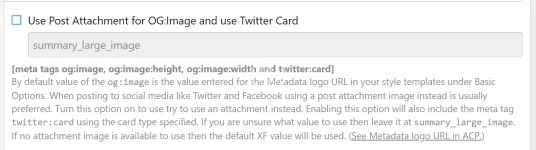
Use Post Attachment for OG:Image and use Twitter Card [meta tags og:image, og:image:height, og:image:width and twitter:card]
By default value of the og:image is the value entered for the Metadata logo URL in your style templates under Basic Options. When posting to social media like Twitter and Facebook using a post attachment image instead is usually preferred. Turn this option on to use try to use an attachment instead. Enabling this option will also include the meta tag twitter:card using the card type specified. If you are unsure what value to use then leave it at summary_large_image. If no attachment image is available to use then the default XF value will be used. (See Metadata logo URL in ACP.)
*** GUESTS NEED PERMISSIONS TO VIEW ATTACHMENTS IN ORDER TO USE AN ATTACHMENT AS THE OG:IMAGE! ***
Use the calculated XF 'article' cover image for the OG:Image if no post attachments are found [meta tags og:image]
If the option to use a post attachment does not find any matching attachments or if the option is turned off then this option will use the XF calculated 'article' cover image as the og:image value. Doing this has concerns that need to be taken into account. If guests do not have permissions to view attachments and if an attachment is found then the thumbnail will be used. If no image attachment is found then it will use the URL of an embedded image. When using the cover image function, whether it is an attachment, thumbnail, or remote image, the dimensions of the selected image are not checked to see if they meet the requirements for use by Twitter and Facebook. The option is there but should only be turned on if you are really sure about it.

Use the Metadata Logo as the XF 'article' cover image if no images are found
When threads are listed using the XF 'article' template it uses 'cover image' function to find an image to be be displayed. If no image is found then this option will use the Metadata Logo for the article cover image so that all threads are displayed in the listing with an image.

Changes the XF 'article' phrase View full article to the phrase View more
Several add-ons, such as [CinVin] Featured Threads, use the XF 'article' view for listing threads. When used in different add-ons the default phrase used for the link to the view the full thread is View full article but the thread might not be an article thread type. Turning this option on will change the template to use the View more phrase instead.

After installing go into your XF Options page and look for "CinVin - Style Tweaks" to change your settings.
Change "What's New" Icon Link to "New Posts"
On mobile devices (small screen sizes) a "What's New" lightning bolt icon is shown in the navigation bar. By default this links to the "What's New" page. This option changes the link to "New Posts" instead.
Add Back Icon on Mobile
On mobile devices (small screen sizes) a new 'back' icon can be shown in the navigation bar. This can be seen in action here at Alien Soup and at our sister sites like Cameraderie.
Unfurl Description Length
Enter the maximum length to use for the text of unfurled URLs. The default value is hard-coded in the bb_code_tag_url_unfurl template. Enter a new maxium length value here or leave it as 0 to use the XF default value from the template. (See thread 161444 at XenForo.com for reference.)
Use Post Attachment for OG:Image and use Twitter Card [meta tags og:image, og:image:height, og:image:width and twitter:card]
By default value of the og:image is the value entered for the Metadata logo URL in your style templates under Basic Options. When posting to social media like Twitter and Facebook using a post attachment image instead is usually preferred. Turn this option on to use try to use an attachment instead. Enabling this option will also include the meta tag twitter:card using the card type specified. If you are unsure what value to use then leave it at summary_large_image. If no attachment image is available to use then the default XF value will be used. (See Metadata logo URL in ACP.)
*** GUESTS NEED PERMISSIONS TO VIEW ATTACHMENTS IN ORDER TO USE AN ATTACHMENT AS THE OG:IMAGE! ***
Use the calculated XF 'article' cover image for the OG:Image if no post attachments are found [meta tags og:image]
If the option to use a post attachment does not find any matching attachments or if the option is turned off then this option will use the XF calculated 'article' cover image as the og:image value. Doing this has concerns that need to be taken into account. If guests do not have permissions to view attachments and if an attachment is found then the thumbnail will be used. If no image attachment is found then it will use the URL of an embedded image. When using the cover image function, whether it is an attachment, thumbnail, or remote image, the dimensions of the selected image are not checked to see if they meet the requirements for use by Twitter and Facebook. The option is there but should only be turned on if you are really sure about it.
Use the Metadata Logo as the XF 'article' cover image if no images are found
When threads are listed using the XF 'article' template it uses 'cover image' function to find an image to be be displayed. If no image is found then this option will use the Metadata Logo for the article cover image so that all threads are displayed in the listing with an image.
Changes the XF 'article' phrase View full article to the phrase View more
Several add-ons, such as [CinVin] Featured Threads, use the XF 'article' view for listing threads. When used in different add-ons the default phrase used for the link to the view the full thread is View full article but the thread might not be an article thread type. Turning this option on will change the template to use the View more phrase instead.


![[CinVin] Emoji Tweaks (use SVG images for emoji instead of PNG)](/data/resource_icons/4/4243.jpg?1736231875)
![[CinVin] Footer Tweaks](/data/resource_icons/4/4511.jpg?1720149262)
![[CinVin] Gravatar Tweaks](/data/resource_icons/4/4149.jpg?1720149256)