

- Compatibilidade com XF
- 2.2.x
- Descrição curta
- enables a XenForo installation to automatically toggle light and dark styles
This modification enables a XenForo installation to automatically toggle light and dark styles based on the user browser's UI setting "prefers-color-scheme".
Adding this CSS media feature directly to XenForo CSS definitions is hardly possible for the current architecture. Switching between light and dark UI without major modifications is easier done by switching between different styles.
Various solutions to optimize a manual or time-based switching between styles are/were already available, their advantage is the absolutely user-oriented selection of the style. On the other hand, automatic switching can be very convenient. There are several requirements where automatic switching of styles can be a useful or additional solution: The other available solutions haven't all been tested in combination with jsdmat, but it is likely that they can coexist very well offering a combined scenario of manual and automatic style switching as far as the settings match.
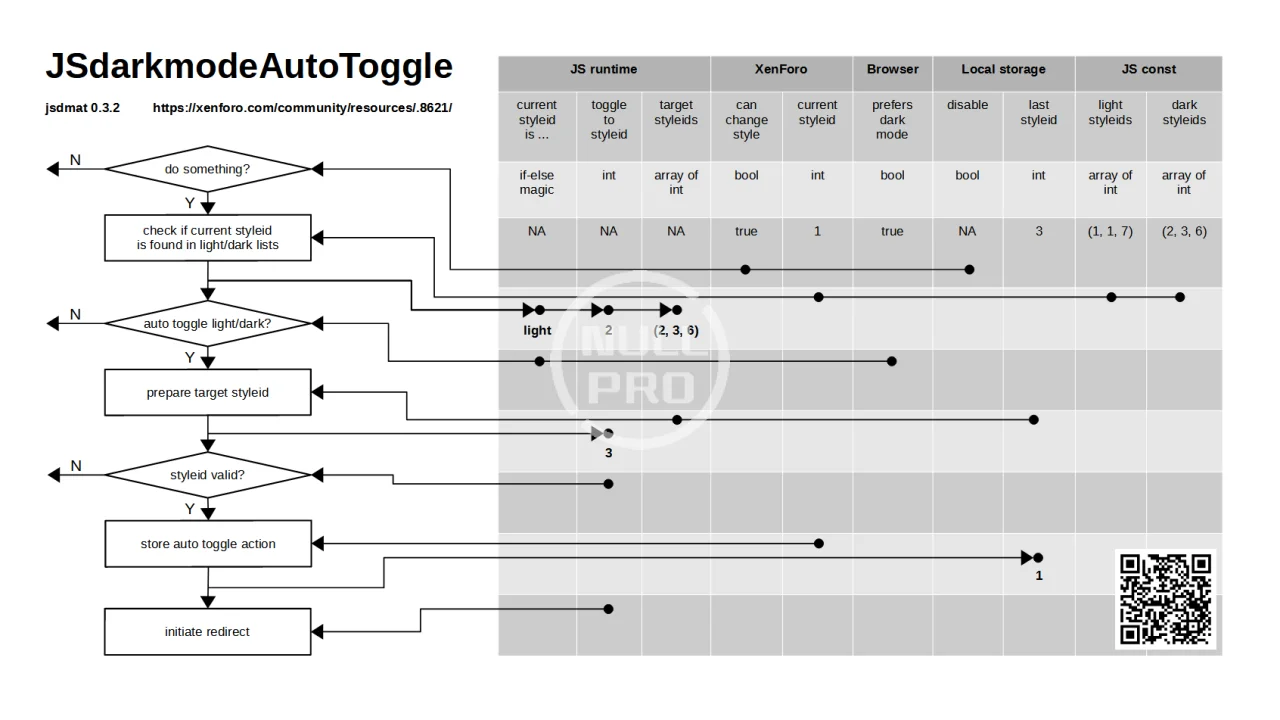
Collecting XenForo data initially, the JS code then checks the current state on load or triggered and initiates a style change via redirection if appropriate. The switch logic is determined by two corresponding lists of light and dark styles to be toggled automatically. All style_id not in list won't be toggled and stay manually chosen.
Adding this CSS media feature directly to XenForo CSS definitions is hardly possible for the current architecture. Switching between light and dark UI without major modifications is easier done by switching between different styles.
Various solutions to optimize a manual or time-based switching between styles are/were already available, their advantage is the absolutely user-oriented selection of the style. On the other hand, automatic switching can be very convenient. There are several requirements where automatic switching of styles can be a useful or additional solution: The other available solutions haven't all been tested in combination with jsdmat, but it is likely that they can coexist very well offering a combined scenario of manual and automatic style switching as far as the settings match.
Collecting XenForo data initially, the JS code then checks the current state on load or triggered and initiates a style change via redirection if appropriate. The switch logic is determined by two corresponding lists of light and dark styles to be toggled automatically. All style_id not in list won't be toggled and stay manually chosen.
| description | code | visualization |
|---|---|---|
| Auto toggle definition: JavaScript: lightStyles: [ 1, 1, 7 ], darkStyles: [ 2, 3, 6 ], | 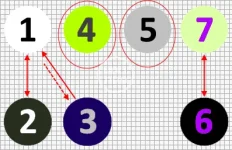
|
- Browser prefers dark, entering the platform at style 1, the auto toggle redirects to style 2,
- flip browser to light -> auto toggle back to 2 (vice versa).
- Browser prefers light, entering the platform at style 3, the auto toggle redirects to style 1,
- flip browser to dark -> auto toggle back to 3 (vice versa).
- Entering the platform or changing the style manually to 4 or 5 will stop the auto toggle,
- changing the style to a style not 4 or 5 -> auto toggle starts again and flips directly, if chosen style doesn't fit to browser's preference.
- Auto toggle between unlimited number of styles
- Not listed styles won't be affected of auto toggle but can be manually chosen
- No need for the exact same number of light and dark styles -> utilizes multipath relations:
- if no "last style_id" available, first match in start list wins (see example above: entering at default style -> 1, toggle -> 2)
- if "last style_id" available (and fits to browser preference), "last style_id" wins (see example above: entering at preset style -> 3, toggle -> 1, toggle -> 3)
- Advanced manual override of auto toggle preset utilizing "last_style_id" (see example above: entering at default style -> style 1 is active, toggle -> 2, manually chose style 6, -> toggle back to 1, -> toggle to 6, -> stable loop)
- Event listener for prefers-color-scheme, proactive light/dark toggle without reload
- XenForo stores the last active style_id for logged in users server-side.
- Effect: Parallel use of more than one logged in device/browser at the same user account pushes the last active style_id permanently vice versa all devices/browsers (accidentally) having different light/dark preferences.
- Solution: sorry, none yet (KIS).
- Styles being listed for auto toggle can't be chosen manually if they do not fit to browser preferences.
- Effect: The auto toggle mechanism flips the style immediately back/away.
- Solution: Add child styles not being part of the auto toggle definition, proper naming of styles recommended.
- Page reloads to switch style cost traffic and time (sorry)
- Opening a bookmarked tab group of several XenForo pages at once can cause race conditions leading to differently styled tab contents.
- There must be at least 2 enabled styles.
- Download and unzip package.
- Upload contents of /upload to XenForo folder:
- /js/jsdmat
- /js/jsdmat/jsdmat.js
- /js/jsdmat/jsdmat.min.js
- Prepare given template invocation code (txt file)
- Insert your platform's style_ids into lightStyles and darkStyles lists.
- Double check if the same number of elements is present in both lists.
- Modification of template PAGE_CONTAINER for all affected (parent) styles:
- Add prepared invocation code to the very end of PAGE_CONTAINER.
![Brazilian Language [PT-BR]](/data/resource_icons/27/27475.jpg?1773559468)


![[cXF] Light and dark mode switch](/data/resource_icons/0/809.jpg?1740446875)
![[TB] Light Dark - One-click Day and Night Mode Switching](/data/resource_icons/25/25604.jpg?1754540374)
![[TB] Dark Light Button](/data/resource_icons/24/24909.jpg?1748845155)