

- Compatibilidade com XF
- 2.3.x
- Descrição curta
- Display Style Choice lets users customize username colors based on their selected user groups in XenForo 2.3+ without admin intervention. Admins can lock specific groups for visual distinction. Live color preview ensures accurate appearance before saving changes. Zero-query performance and lightweight footprint make it a seamless addition to your forum.
Let your users choose which user group's username color they display. Members with multiple user groups can pick their preferred display style from Account > Preferences, no admin intervention needed.
When a user belongs to multiple user groups, XenForo normally picks the display group based on group priority. This addon gives users control over that choice. A dropdown on the Preferences page lists all their eligible groups with a live color preview, so they can see exactly how their name will appear before saving.
Admins can lock specific groups (e.g., staff groups) to prevent users from selecting them, ensuring visual distinction for moderators and administrators is maintained.
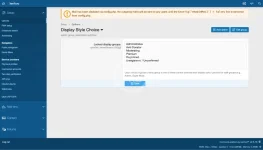
After installation, visit Admin CP > Options > Display Style Choice:
If you encounter any issues or have feature requests, please use the discussion tab on this resource page. Include your XenForo version and any relevant error log entries when reporting problems.
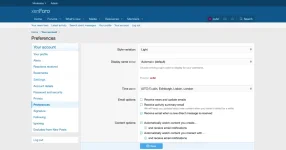
When a user belongs to multiple user groups, XenForo normally picks the display group based on group priority. This addon gives users control over that choice. A dropdown on the Preferences page lists all their eligible groups with a live color preview, so they can see exactly how their name will appear before saving.
Admins can lock specific groups (e.g., staff groups) to prevent users from selecting them, ensuring visual distinction for moderators and administrators is maintained.
- User-facing dropdown - users pick their preferred display group from Account > Preferences
- Live color preview - username color updates in real time as users browse options
- Admin lockable groups - prevent users from selecting staff or other protected groups via a simple admin option
- Zero-query performance - overrides XenForo's display group calculation at the repository level with no additional database queries
- Lightweight footprint - single column added to the xf_user table; 3 clean class extensions
- Clean uninstall - all data and schema changes are fully removed on uninstall
- Respects XF patterns - uses standard XenForo class extensions (XFCP), phrases, and options
- XenForo 2.3.0 or later
- Download and extract the release ZIP
- Upload the
directory toCÓDIGO:Qubn/DisplayStyleChoice
on your serverCÓDIGO:src/addons/ - Go to Admin CP > Add-ons and click Install/upgrade from archive, or install via CLI:
CÓDIGO:php cmd.php xf-addon:install Qubn/DisplayStyleChoice - (Optional) Navigate to Admin CP > Options > Display Style Choice to configure locked groups
After installation, visit Admin CP > Options > Display Style Choice:
- Locked staff groups - select which user groups should be unavailable for user selection. Users belonging to locked groups will still see them listed but cannot choose them as their display style.
If you encounter any issues or have feature requests, please use the discussion tab on this resource page. Include your XenForo version and any relevant error log entries when reporting problems.


![[AndyB] Remove style variation system](/data/resource_icons/20/20383.jpg?1720149340)
![[AndyB] Prefix style manager](/data/resource_icons/21/21025.jpg?1720553660)
![[AndyB] Remove style variation options](/data/resource_icons/23/23675.jpg?1737900586)