

- Compatibilidade com PrestaShop
- 1.7.x
- Descrição curta
- Enhance average cart value with customizable table displays for different product combinations. Ideal for wholesalers and regular buyers, it features filters, quantity discounts, and flexible templates. Customize columns, enable availability indicators, and control visibility based on attributes or specific categories.
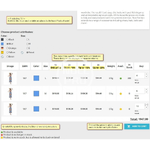
Displays combinations with different prices in a table. Intended for wholesale and regular buyers. Increases the average cart value and encourage visitors to complete orders.
Features
- You may to set or to unset different columns for the table (for example: reference, price, weight, color).
- You may to set extra columns for the table (customization).
- The module adds additional columns for each quantity discount when discount by quantity is available for combinations; or you may configure to display quantity discounts in the price column (it is mostly the wholesaler's feature and the feature to increase the average cart value).
- A customer may add to the cart several different combinations of the same product by one button (it is mostly the wholesaler's feature).
- A customer may to filter combinations of a product by attributes (for example: by color, by size).
- The filter attributes will be displayed in columns automatically if they are too many.
- Calculation for a price summary for each row of the table (i.e., for each combination when quantity is more the one item) when clicking +/- buttons; with this also displayed total price.
- Selling a pack of product (with this option, for example, when a customer up a product combination quantity then this quantity multiplied by the property of minimal quantity of this combination). It is mostly the wholesaler's feature.
- You may to apply different templates to the table and to the filter's block (templates management feature). The distribution includes three templates - two for the filter’s block and one for the table. Other templates you can found in Internet or request to develop.
- You may to set places where you want to place the table and the filter’s block (hooks management feature).
- You may to sort columns of attributes or you may to hide some of them.
- Sorting of the table column values and also sorting of attribute values in the filter block. There are several sorting methods: sorting numbers, sorting by clothes size (i.e.: S, M, L, XL), by attribute sorting position, by reference, by weight, by remains (stock quantities), by price and by general sorting method (this is the string comparison algorithm used by default and it is more or less suitable for all kinds of values).
- You may to enable the block of product availability indicators that is intended to explain which of the combinations are available for purchase (when combination is in-stock, out-of-stock or back-ordering is allowed).
- You may to configure when and how to display the table. For example: do not show the table if there are no combinations; hide combinations with an incomplete set of attributes; display the table for concrete categories in which product pages should display the table (or not display for concrete categories).
- You may to configure to show the table in the tab like in PrestaShop 1.5 (it is useful for many PrestaShop 1.6 themes without build-in tabs but uses an additional module for that).
- It's possible to make a condition in a theme for displaying a default block with combinations (or other blocks) when the table cannot be displayed (for example, disabled for a smartphones); this is a customization of your theme.
- You may configure the column of color attribute, for example, show color name or color thumbnail box or show both; set the size of a color thumbnail box.
- And other options (see screenshots of the settings page) and Other section of this page.


