Magento 2 WebP Images | Automatic WebP Converter By Magefan

Magento 2 WebP Images | Automatic WebP Converter By Magefan 2.5.6 Nulled

Sem autorização para baixar
Associado
20/01/2022
Mensagens
117
Pontuação de reações
69
Credits
$124
The Magento 2 WebP Images Extension enhances your online store's performance by automatically converting and serving your product images in the modern WebP format. WebP provides superior compression compared to traditional formats like JPEG and PNG, resulting in faster page load times and improved user experience without compromising image quality.

demo https://magefan.com/magento-2-webp-optimized-images

Key Features:


  • Automatic WebP Conversion: Seamlessly convert all product and category images to WebP format without manual intervention.
  • Fallback Support: Automatically serves original JPEG/PNG images for browsers that do not support WebP, ensuring full compatibility.
  • Improved Site Speed: Reduce image sizes by up to 30-50%, significantly boosting your site’s loading speed and SEO rankings.
  • Easy Configuration: Manage extension settings directly from the Magento admin panel with a user-friendly interface.
  • SEO Friendly: Faster loading images contribute to better search engine rankings and lower bounce rates.
  • No Impact on Original Images: Original image files remain untouched, ensuring safe and reversible image optimization.
  • Supports Multiple Image Types: Works with product images, category images, CMS pages, and blocks.

Benefits:


  • Enhance your customers' shopping experience with faster loading pages.
  • Boost Google PageSpeed Insights and Core Web Vitals scores.
  • Reduce bandwidth consumption and server load.
  • Fully compatible with Magento 2 latest versions.
 
Anexos
Última edição por moderador:
Can you provide a cracked version?
 
Magefan Community Nulled - replace files and enter any key to save.
Magefan Community Nulled - 替换文件并输入任意键保存。
Yes, I replaced the Community moudle with Magefan Community 2.2.17 Nulled moudle,
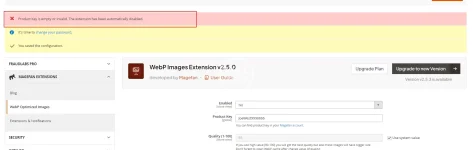
And I deleted the "generated" and "var" directories. After recompiling, the Webp still prompted that it needed to be activated, even though I entered any key in webp Configuration stage.1755479518135.webp
 
Yes, I replaced the Community moudle with Magefan Community 2.2.17 Nulled moudle,
And I deleted the "generated" and "var" directories. After recompiling, the Webp still prompted that it needed to be activated, even though I entered any key in webp Configuration stage.Visualizar anexo 108121
Hold On ,i will check it.new version this package have more vaild .now please modify code from

PHP:
  final public function validate($data)
    {
        if (isset($data[$this->getModule()])) {
            return !empty($data[$this->getModule()]);
        }
        $k = $this->getKey();
      $result =true;
        return $result;
    }
to
CÓDIGO:
  final public function validate($data)
    {
          return true;
    }
on file
module-community-2.2.17\Model\Section.php
to fix your issue .
 
Última edição:
Hold On ,i will check it.new version this package have more vaild .now please modify code from
稍等,我去检查一下。这个包的新版本有更多有效的功能。现在请修改代码。

PHP:
  final public function validate($data)
    {
        if (isset($data[$this->getModule()])) {
如果 (isset($data[$this->getModule()])) { 
            return !empty($data[$this->getModule()]);
        }
        $k = $this->getKey();
      $result =true;   $result = true;
        return $result;
    }
to
CÓDIGO:
  final public function validate($data)
    {
          return true;
    }
on file 在文件中

to fix your issue .
解决你的问题。
Thanks for you tell,

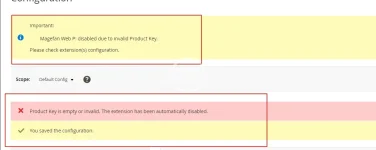
I completed the above modifications and recompiled the code. However, when I accessed the backend page, I found that there was still the error message "Magefan Web P: disabled due to invalid Product Key. Please check the configuration of the extension(s)." Even after I cleared the files and cache and recompiled again, it didn't work.


Besides,
I attempted to remove: </field> <field id="key" translate="label" type="text" sortOrder="30" showInDefault="1" showInWebsite="0" showInStore="0">
<label>Product Key</label>
<frontend_model>Magefan\Community\Block\Adminhtml\System\Config\Form\ProductKeyField</frontend_model>
</field>

On files /Magefan/WebP/etc/adminhtml/system.xml

But,it still didn't work.


1755500547171.webp
 
Thanks for you tell,

I completed the above modifications and recompiled the code. However, when I accessed the backend page, I found that there was still the error message "Magefan Web P: disabled due to invalid Product Key. Please check the configuration of the extension(s)." Even after I cleared the files and cache and recompiled again, it didn't work.


Besides,
I attempted to remove: </field> <field id="key" translate="label" type="text" sortOrder="30" showInDefault="1" showInWebsite="0" showInStore="0">
<label>Product Key</label>
<frontend_model>Magefan\Community\Block\Adminhtml\System\Config\Form\ProductKeyField</frontend_model>
</field>

On files /Magefan/WebP/etc/adminhtml/system.xml

But,it still didn't work.


Visualizar anexo 108136
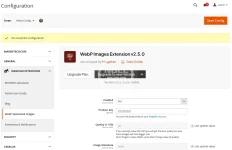
No .what is magento version?clear var folder and then try it .i can not tested faild
2025-08-18_154124.webp
 
Última edição:
Yes, I did clear the var and generated folder, but it still didn't work. My Magento 2 version is 2.4.7-p7.
 
Yes, I did clear the var and generated folder, but it still didn't work. My Magento 2 version is 2.4.7-p7.
Tested version number was 2.4.8 ,no find any issue .if do not modify any code it is work too with new .
CÓDIGO:
  final public function validate($data)
    {
        if (isset($data[$this->getModule()])) {
            return !empty($data[$this->getModule()]);
        }
        $k = $this->getKey();
      $result =true;
        return $result;
    }
this code only was touch issue when upgrading was happen,make sure your files floder permission .and remove var folder,run setup:up and then tested-
 
Tested version number was 2.4.8 ,no find any issue .if do not modify any code it is work too with new .
CÓDIGO:
  final public function validate($data)
    {
        if (isset($data[$this->getModule()])) {
            return !empty($data[$this->getModule()]);
        }
        $k = $this->getKey();
      $result =true;
        return $result;
    }
this code only was touch issue when upgrading was happen,make sure your files floder permission .and remove var folder,run setup:up and then tested-
Sometimes it is necessary to restart PHP to update OPCache data. Even if you need to restart Apache or nginx. If your disk has M2 cache, sometimes you also need to restart the server,linux will cache file when lots of files was update or delete .you can find delete ALL twice ,it was really deleted
 
Top