

Dear customers !
I’m happy to announce the release of Events Booking version 5.6.0! This release contains below improvements:
1. Improve Upcoming Events Module
- Added parameter to allow showing Register Buttons to allow users to click on to register for your events from the module without having to access to event details page. Supported for Default and Horizontal layout (with shopping cart disabled)
2. Allow Using Joomla Mail Template Layout
Joomla 5.2.0+ supports Mail Template Layout to have consistent mail styling and layout for all emails (HTML emails). If you want to use that mail template layout in Events Booking, set Use Joomla Mail Template config option to Yes and Events Booking will use global Joomla Template Layout for sending email instead of using it's own layout. It makes Events Booking emails look consistent with all other emails send from your site
3. Refund Registration Improvement
- Added Refund Registration permission to control who can refund registrations. It is useful in case you want to allow certain user groups to manage your registrants but do not want to allow them to refund (only Admin can do that)
- Support refund for Authorize.net payment plugin
4. Improve Events Booking - Google Structured Data plugin
Added parameters to allow entering default Organizer Name, Organizer URL and Performer Name. That will help saving you from having to enter these data for your individual event if these data are the same for all of your events. Of course each event can still override this default data if required
5. Added Events Booking - Delete Event Notification Plugin
The plugin allows sending notification to administrator when events are deleted. Could be useful, especially when you allow frontend users to submit and delete in frontend of your site
6. Add Access Level For Event Data
Added config options to allow you to only enable users with the configured access level to see Event Capacity, Number Registered Users and Available Place information of your events in frontend of your site.
7. Other Small Improvements
- Improve Registration History: Added Categories parameter. If you select certain categories there, only registrations from events belong to these categories will be displayed
- Improve Events Search/Filter Bar: Hide categories and locations without events from categories and events filter dropdown if configured
- Added toolbar button to allow access to parent event when edit a child event
- Fix/Improve Additional Dates plugin: Do not show cancel before date and location fields if these fields are configured to be hidden on submit event form
- Hidden tools added to allow entering admin email subject inside each event and allow translating Custom Event URL when it is needed.
8. Bugs Fixed
- Fixed custom fields validation error if custom fields depends on ticket types
- Prevent users to join waiting list if he is already registered for event
- Fixes custom fields not being show on free event registration form if Position of the field set to Below Payment Information
Please update your site to Events Booking 5.6.0 to enjoy these new features, improvements. Thank you for continuing to use our products and support our development
Regards,
Tuan
Dear customers !
I’m happy to announce the release of Events Booking version 5.5.0! This release contains below improvements:
1. Improve Events Booking - Auto Event Data plugin
The plugin automatically calculates important event dates of event based on Event Date. In earlier releases, it only support Cancel Before Date. This version extends the plugin so that the following dates are supported:
- Registration Start Date
- Cut Off Date
- Cancel Before Date
- Registration Edit Close Date
- Publish Up
- Publish Down
- Early Bird Discount Date
Each of these dates contains parameter allow you to decide whether it should be auto calculated, what's the offset (for example, 5 days before event date) and what's the unit (Days/Hours). This make the plugin and flexible if your events allow you to setup dates like that.
2. Improve Events Booking - Joomla Groups Plugin
The plugin allow you to assign registrants of an event to the user groups of your choice. In this release, we add a new parameter called Remove From Groups When Registration Cancelled. If set to Yes, when registration is cancelled, registrants will be removed from the assigned user groups
3. Improve Timeline Layout
New parameters are added to Category and Upcoming Events Timeline layout to allow you to show Capacity, Number Registrants and Available Places of each event if needed. In the past, you will need to make layout override to have that, but now, it is configurable 🙂
4. Improve Categories Menu Item Types
The categories menu item types now have new parameters to allow you to control ordering of categories displayed in the view. It can be ordered by Ordering (default), Title or ID and in ASC or DESC direction
5. Improve Search Filters
The search filters (displayed above events list) on category and upcoming events views now only show categories configured in menu items (if configured) instead of all categories as before.
6. Improve Improved Events Booking - Related Events Plugin
The plugin is used to set and display related events of an event under event details page. It now has parameters to allow you to turn of the information you do not want to display the plugin if required.
7. Improve Upcoming Events Module
Allow you to show event end date in default layout if needed.
8. Improve Registration History
Do not display and allow registrants to download certificate if the event they registered for was cancelled
9. Improve Registration Form
The GPDR layout is refactored to make it clear that users need to accept to GPDR to register for events and the GDPR fields also look consistent with other fields on registration form
10. Improve Monthly Calendar Menu Item Type
New parameter added to allow control position of Calendar Legend on the page
11. Improve Multilingual
In some cases, you have multilingual website but do not wish to translate Events Booking data to all languages. Currently, you will have to copy data from default language to allow other languages and it is time wasting. In this new release, if you do not need to translate data, and only use data from default language, you can set Disable Multilingual config option to Yes
12. New EB Authorize.net Accept Hosted Payment Plugin
A new paid payment plugin called EB Authorize.net Accept Hosted is added in this release. Authorize.net recommends users to migrate from Authorize.net SIM to Authorize.net Accept Hosted. Authorize.net SIM was deprecated, it is not reliable anymore because it's Slient Post (which is used to notify system about payment) is not reliable, usually blocked by Web application firewall of server. So if you are using EB Authorize.net SIM, we recommend going to joomdonation.com/payment-plugins/events-...payment-plugins.html , purchase and install EB Authorize.net Accept Hosted payment plugin and use it instead.
Please update your site to this updated package of Events Booking to uses these improvements. Thanks for continue using our products and support our development
Regards,
Tuan
1. Improve QRCODE Checkin
From this version, you can checkin registrants using Handheld QRCODE Scanner if you have the device available. This method should be faster and easier than the traditional built-in QRCODE scanner, especially if your event has large number of registrants. See this documentation for more details
2. Added Events Booking - Emails Restriction plugin
This plugin allow you to prevent users with certain emails from registering for your events. You can restrict exact emails or wildcard patterns, for example, if you want to prevent all gmail emails, you can use pattern *.gmail.com (just an example)
3. Added Option for Social Login Integration
A new config option called Show Extra Login Buttons is added to Events Booking. If set to Yes, you can use socials plugin such as Akeeba Socials Login to allow users to login using social account while registering for your events.
4. Improve Events Management
- Allow searching for events created by certain user uses created_by:username searching syntax
- Added config option to allow Showing Location on events management screen
- Show Private Booking Count column if that field is enabled on add/edit event form
5. Improve Registration History
Show Ticket Types column which contains ticket types data of user's registration if he/she registered for events with ticket types enabled.
6. Improve Speakers, Sponsors plugin
Added Thumb Width, Thumb Height parameters to allow resize speakers/sponsors images and use these resized images for displaying speakers/sponsors of your event
7. Improve ACYMailing Plugin
- Synchronize data from Events Booking to ACYMailing for both new and existing ACYMailing subscribers
- Improve code to be better compatible with ACYMailing 10.0.0+.
8. Added EB Nexi Checkout Payment Plugin
The plugin allows you to use Nexi - Checkout to receive payments from your registrants when they register for your events if needed.
Please update your site to Events Booking 5.4.0 to enjoy these new features, improvements. Thank you for continuing to use our products and support our development. Happy New Year to everyone !
I’m happy to announce the release of Events Booking version 5.3.1! This releases focus improve FulCalendar menu item type, added support for new captcha plugins and some other small improvements
1. FullCalendar menu item type improvements
- Updated fullcalendar script uses in Events Booking to latest version 6.1.19
- Added Month View Format parameter which allow display events in a month using one of two formats: Day Grid (the current format) and List (screenshot below)
- Added Week View Format parameter which allow display events in a week using one of three supported formats: Time Grid (the current format), Day Grid and List (see screenshots below for the two new formats)
- Added Day View Format parameter which allow display events in a day using one of three supported format: Time Grid (the current format), Day Grid and List (see the screenshots below for the two new formats)
- Added Year button to allow viewing all events in each year in Stack (each row is one month) or Grid (each row contains number of months)
2. Added support for two new captcha plugins
- You can now use hcaptcha ( extensions.joomla.org/extension/hcaptcha/ ) or cloudfare turnslite ( extensions.joomla.org/extension/cloudflare-turnstile/ ) captcha plugins in Events Booking if needed
3. Support some tags for event description
- You can now use basic tags such as [EVENT_ID], [TITLE], [SHORT_DESCRIPTION], [LOCATION_NAME] in description of events if needed
Please update your site to this updated package of Events Booking to use these improvements. Thanks for continue using our products and support our development
Today, I am happy to announce the new version 5.2.0 of Events Booking. This version bring the following improvements to the extension
1. Joomla 6 Compatible
Joomla 6 is planned to be released on 14 October 2025, so in less than one month. This is a new major release, so there are backward incompatible changes and we have to spend time to work on Events Booking to make it compatible with the next Joomla major release. As of right now, we are happy to inform that Events Booking is compatible with Joomla 6 Beta 3 (was released yesterday), so if you want to test/use Events Booking with Joomla 6, it is already compatible
2. Support Batch Process Events, Categories
With batch process for events and categories, you can now batch change Access Level, Registration Access Level for multiple categories, evets at once.
3. Allow Adding Location Directly On Submit Event Form
On submit event form, if the location for your event is not available yet, you can easily adding new location directly from add event screen (on a popup) instead of having to go to a different page to add location and then come back to add event form again
4. Improve Shopping Cart
Added a new config option called Disable Cart Popup to redirect users directly to cart page after adding event to cart (avoid showing events on popup)
5. Various layout improvements
- Show image and description of location on location page
- Added a new option to allow not showing events properties on events list default layout
- And some small bugs fixes, code improvements
T
oday, I am happy to announce the new version 5.1.0 of Events Booking. This version bring the following improvements to the extension
1. Implemented Modern Dashboard
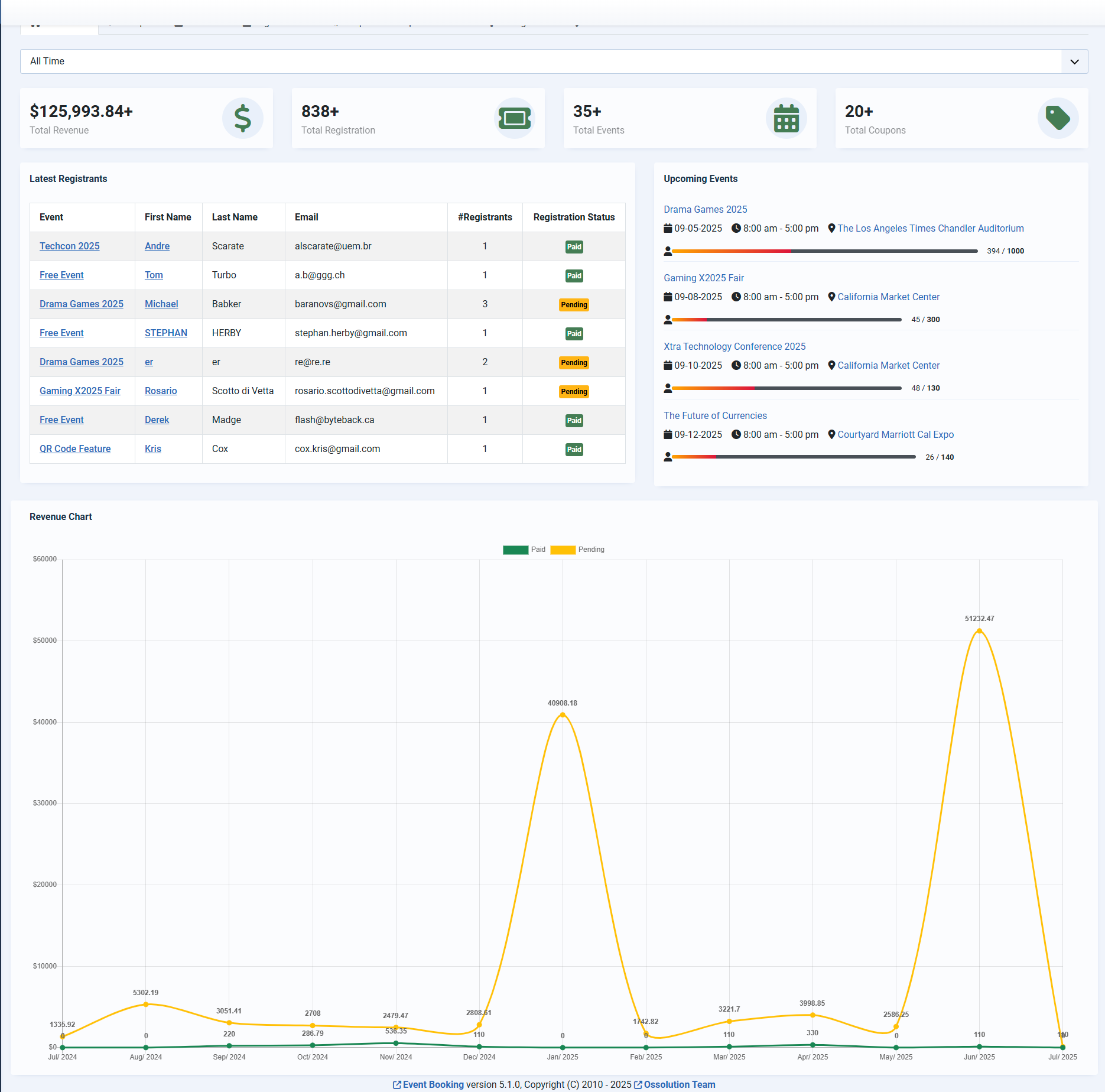
A new, beautiful, modern dashboard in implemented in this release. It allows you to quickly viewing statistic data (all the time or certain selected duration), access to next upcoming events, latest registrations and revenue chart for last 12 months... Hope you will love it and in case something could be improved, please give us your feedback
2. Implemented some paid plugins
We implemented some useful paid plugins in this release. While it is not needed by most of customers, it could be useful when you need it:
- EB Google Calendar: Allows synchronize events which you added in Events Booking to your own Google Calendar
- EB Google Spreadsheet: This plugin automatically synchronizes registrants of your events to Google Spreadsheets.
- EB E-Invoice: This plugin enables automatic generation of electronic invoices (e-invoices) alongside the standard PDF invoice issued by the Events Booking. This is required by law in some Europe countries by the end of this year, so we developed it to have it ready to use when you need it
You can access to Events Booking, and look at Paid Add-ons tab and see more details information from there if you need to have more information about these plugins
3. Improve Backend Layouts
- Implement search tools (same with Joomla core) to allow show/hide filters on Events/Custom Fields/Registrants Management screens (which has many filters) which make the layout more tidy.
- Allow showing event custom fields directly on General tab (in case you only have few fields) from add/edit event form instead of in a separate tab
4. Added New Scheduled Task
A new scheduled task called Events Booking - Delete Past Events Index is added allow you to delete past events from smart search so that it won't appear on search result
5. Improve Additional Dates Plugin
Allow you to control Cancel Before Date for children events created by additional dates plugin
6. Other small improvements and bugs fixes
- Use Joomla password layout for showing password on registration form (to make it consistent with other forms use password in Joomla, allows show/hide password characters...)
- Allows use different Submit Event Redirect URL (each URL for a language) on multilingual website.
- Handle Reply To email properly when Reply To email is configured inside each event.
- Handle Min Group Number and Max Group Number properly on shopping cart.
- Allow overriding Events Booking - Map plugin output.
Please update your site to this latest version of Events Booking to use these improvements and bugs fixes. Thanks for continue using our products and support our development.
This is a maintenance release. On this version, we focus converting some system plugins in the extensions to Joomla Scheduled Tasks. During the update process, the system will uninstall these converted plugins, and create necessary scheduled tasks automatically to replace these plugins, so you just need to update and do not have to do anything. Expect some performance improvements with these changes
1. Various Layout Improvements
- Improve add/edit event page layout, both from frontend and backend
- Improve frontend location submission layout
- Added menu item parameters to allow show/hide columns on frontend managements
2. Improve Registration History
- Added new menu item parameter Show Cancelled Registrations to allow hiding cancelled registrations
- Added menu item parameters to control show/hide columns on Registration History page
3. Improve Shopping Cart
- Added config option Add More Events Menu Item allows you to choose the page which users will be redirected to (usually the page which list your events) when click on Add More Events button instead of using default page. That allow users to see and add other events to cart easier.
4. Improve Speakers/Sponsors Management
You can now unpublish speakers/sponsors from Speakers/Sponsors management page. These unpublished items won't be displayed on the frontend anymore
5. Technical Change: Replace CMS FileSystem package By Framework FileSystem package
The CMS FileSystem package was deprecated need to be replaced by Framework FileSystem package. We spent time to work on this replacement to make sure the extension continue working well with future releases of Joomla (the upcoming Joomla 6) without requiring Behaviour - Backward Compatibility plugin enabled
6. Other Improvements
- Improve Resend Email Feature: You can now resend email to group members. This was not supported before.
- Improve Upcoming Events Module: Added From Date and To Date parameters, allow you to show events from the date range you want in the module.
- Improve Invoice Feature: Added new config option Send Invoice When Registration Approved. You can set it to No if you do not want to send invoice to registrants when their registrations (which use offline payment methods) are approved
- Improve Events Import: You can now import group registration rates for your events using events import feature if needed.
- Events Booking - Map: Added parameters to allow hiding children events on the map
- Allow each event to override the behavior of Reduce Registration Process config option.
1. Fixed an incompatible issue with Joomla 5.2.3+
This could make custom field which you assigned to events might not be showed on registration form under certain condions.
2. Improve Frontend Registrants Management
Added feature to allow batch download invoices from registrants management in the frontend
3. Improve Events Management
Added a new column to show number of waiting list users for your events if waiting list is enabled
4. Improve Events Booking - Latest Registrants module
Added parameters to allow show/hide the columns currently being displayed
5. Added Schedule Task to allow deleting old QRCODEs
You can setup schedule task to QRCODEs which were created more than one day before to clean up / save hosting space
6. Updated EB Stripe Checkout Payment Plugin
Added advanced parameters to allow collect more information when users process payment at Stripe website like collecting phone number, billing address, Tax ID. This is not needed by most users, but sometime, you might need it for your own purpose
7. Various Bugs Fixes
- Allow setup placeholder for more field types like URL, Email, Number....
- Improve email validation on shopping cart to prevent registration if the email does not pass the rules defined in Email Domain Options in Joomla Users Management
- Added option to allow setup currency for each event when event is submitted from frontend of your site
1. Compatible With ACYMailing 10
The ACYMailing team recently release ACYMailing 10, which is a new major release of their extension. In that version, they made some backward incompatible changes, and that causes fatal error in Events Booking if you use Events Booking - AcyMailing plugin (on add/edit event and registration process). I updated the plugin to compatible with this latest version of ACYMailing, and need to release this new version of Events Booking to make sure everything will continue working well if you use the plugin and updated to ACYMailing 10.
2. Improve Custom Field
- Allow easier choosing more client validation rule for custom field as described in documentation docs.joomdonation.com/eventsbooking/basi...ted-validation-rules . You can choose some new rules for your custom field using Validation Rules setting.
- For quantity field, show available quantity of each option even for super users/administrators
3. Other Improvements
- Allow controlling Deposit Amount Apply For setting for each event instead of just a global setting which is applied for all events.
- Support more tags like [REGISTER_DATE], [TICKET_ NUMBER] for the email message send to group members.
4. Small Bugs Fixes
- Fixed link to event from mini calendar does not use Event Details URL (if set for the event)
- Fixed Number custom field type, allows setup Min, Max and Step in decimal number (before, you can only integer, mean you could not set step to 0.01 for example)