
![[XenCrazy] XFRM Download Button Styler](/data/resource_icons/27/27789.jpg?1780074880)
- Compatibilidade com XF
- 2.3.x
- Descrição curta
- XFRM Download Button Styler is a free XenForo Resource Manager add-on that enhances download, external download, and purchase buttons for better visibility. Ideal for forum owners looking to improve button aesthetics without altering core functionality.
[XenCrazy] XFRM Download Button Styler is a free XenForo Resource Manager add-on that lets you style the main Resource Manager download buttons from the Admin CP.
It is designed for forum owners who want download, external download, and external purchase buttons to stand out a little more without editing templates or writing custom extra.less code.
This add-on only changes the visual styling of supported active Resource Manager buttons. It does not change permissions, download behavior, purchase behavior, payment handling, licensing, or marketplace functionality.
This add-on started from a real forum admin discussion about making XenForo Resource Manager download buttons easier to notice. On one of my own forums, a member pointed out that the Resource Manager download button could be easy to miss, especially for people who are new to the site or not used to where XenForo places resource actions.
Rather than manually adding extra text to resource descriptions or relying on one-off extra.less tweaks for a single forum, I decided to turn the idea into a small reusable add-on. The goal is simple: make important Resource Manager action buttons easier to spot while keeping XenForo’s normal Resource Manager behavior intact.
Quick video demo
This short demo shows the add-on using a custom external purchase button with custom button text, a custom gradient background, a custom icon color, and advanced styling controls.
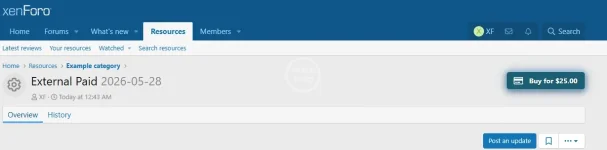
Styled Resource Manager button
A simple example of a styled Resource Manager action button using the default solid background style. This shows the kind of front-end result admins can create without editing templates or writing custom CSS.
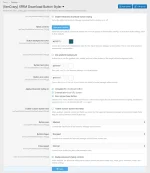
Basic settings
The main options page keeps the everyday controls easy to reach, including the button background color, text color, icon color, supported button types, button size, button shape, and pulse speed.
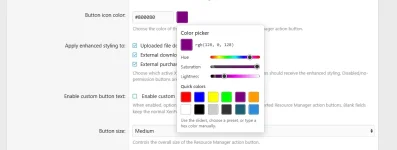
Built-in color picker
The add-on includes a built-in color picker for color-based options, so admins can choose button colors visually instead of typing hex values by hand. You can use the sliders, pick from quick preset colors, or manually enter a hex value if you already know the exact color you want.
Gradient mode and custom button text
When gradient mode is enabled, the gradient color fields appear automatically. This view also shows the optional custom button text fields for uploaded downloads, external download URLs, and external purchase buttons.
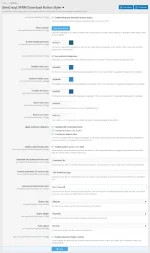
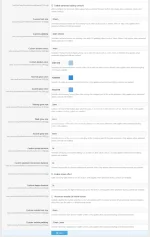
Advanced styling controls
Advanced controls stay hidden until enabled, keeping the basic settings cleaner for normal use. When enabled, admins can fine-tune sizing, padding, border radius, border color, glow colors, animation timing, sheen behavior, and mobile styling.
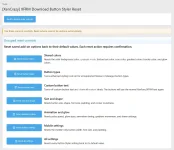
Reset controls
The reset page gives admins a safer way to experiment. Individual groups of settings can be reset without wiping everything, or all Button Styler settings can be restored to their defaults.
After installation, go to:
Setup → Options → [XenCrazy] XFRM Download Button Styler
Review the default settings and click Save once to apply the default styling options.
It is designed for forum owners who want download, external download, and external purchase buttons to stand out a little more without editing templates or writing custom extra.less code.
This add-on only changes the visual styling of supported active Resource Manager buttons. It does not change permissions, download behavior, purchase behavior, payment handling, licensing, or marketplace functionality.
This add-on started from a real forum admin discussion about making XenForo Resource Manager download buttons easier to notice. On one of my own forums, a member pointed out that the Resource Manager download button could be easy to miss, especially for people who are new to the site or not used to where XenForo places resource actions.
Rather than manually adding extra text to resource descriptions or relying on one-off extra.less tweaks for a single forum, I decided to turn the idea into a small reusable add-on. The goal is simple: make important Resource Manager action buttons easier to spot while keeping XenForo’s normal Resource Manager behavior intact.
Quick video demo
This short demo shows the add-on using a custom external purchase button with custom button text, a custom gradient background, a custom icon color, and advanced styling controls.
- Uploaded file download button
- External download URL button
- External purchase button
- Solid button background color
- Optional three-color gradient background
- Separate button text and icon colors
- Built-in color picker with sliders, quick presets, and manual hex input
- Button size, shape, and pulse speed controls
- Optional custom button text
- Button targeting by supported XFRM button type
- Advanced styling controls that stay hidden until enabled
- Gradient color fields that stay hidden until gradient mode is enabled
- Reset controls for restoring default settings
Styled Resource Manager button
A simple example of a styled Resource Manager action button using the default solid background style. This shows the kind of front-end result admins can create without editing templates or writing custom CSS.
Basic settings
The main options page keeps the everyday controls easy to reach, including the button background color, text color, icon color, supported button types, button size, button shape, and pulse speed.
Built-in color picker
The add-on includes a built-in color picker for color-based options, so admins can choose button colors visually instead of typing hex values by hand. You can use the sliders, pick from quick preset colors, or manually enter a hex value if you already know the exact color you want.
Gradient mode and custom button text
When gradient mode is enabled, the gradient color fields appear automatically. This view also shows the optional custom button text fields for uploaded downloads, external download URLs, and external purchase buttons.
Advanced styling controls
Advanced controls stay hidden until enabled, keeping the basic settings cleaner for normal use. When enabled, admins can fine-tune sizing, padding, border radius, border color, glow colors, animation timing, sheen behavior, and mobile styling.
Reset controls
The reset page gives admins a safer way to experiment. Individual groups of settings can be reset without wiping everything, or all Button Styler settings can be restored to their defaults.
- XenForo 2.3.x
- XenForo Resource Manager 2.3.x
After installation, go to:
Setup → Options → [XenCrazy] XFRM Download Button Styler
Review the default settings and click Save once to apply the default styling options.


![[AndyB] XFRM sort buttons](/data/resource_icons/1/1101.jpg?1720554786)
![[MDV] XFRM: Remove History Download](/data/resource_icons/5/5346.jpg?1720149262)