Magento 2 Imagens WebP | Conversor Automático de WebP por Magefan

Magento 2 Imagens WebP | Conversor Automático de WebP por Magefan 2.5.7 Nulled

Sem autorização para baixar
Associado
20/01/2022
Mensagens
120
Pontuação de reações
71
Credits
$133
Extensão de Imagens WebP Magento 2 melhora o desempenho da sua loja online ao converter e servir automaticamente as imagens dos seus produtos no formato moderno WebP. O WebP oferece compressão superior em relação aos formatos tradicionais como JPEG e PNG, resultando em vezes mais rápidas carregamentos de página e experiência do usuário melhorada sem comprometer a qualidade das imagens.https://magefan.com/magento-2-webp-optimized-imagesCaracterísticas Principais:
[]*Conversão de Imagens WebP Automática:Converte todas as imagens de produto e categoria para formato WebP sem intervenção manual.[]*Suporte de Fallback:Serve imagens originais em formato JPEG/PNG para navegadores que não suportam WebP, garantindo total compatibilidade.[]*Melhor Velocidade do Página:Diminua as medidas das imagens em até 30-50%, significativamente aumentando o velocidade de carregamento do seu site e os rankings no SEO.[]*Configuração Fácil:Gerencie as configurações do extensão diretamente no painel de controle Magento com uma interface amigável.[]*SEO Amigável:Faster carregamento de imagens contribui para melhor classificação nos motores de busca e para menores taxas de abandono de página.[]*Nenhum Impacto nos Imagens Originais:Imagens originais permanecem sem alterações, garantindo otimização de imagem segura e reversível.[]*Suporta Multiplos Tipos de Imagens:Funciona com imagens de produtos, imagens de categoria, páginas do CMS e blocos.[/list]
Benefícios:
 
Anexos
Última edição por moderador:
Can you provide a cracked version?
 
Magefan Community Nulled - replace files and enter any key to save.
Magefan Community Nulled - 替换文件并输入任意键保存。
Yes, I replaced the Community moudle with Magefan Community 2.2.17 Nulled moudle,
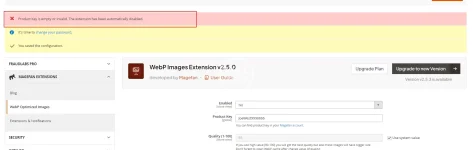
And I deleted the "generated" and "var" directories. After recompiling, the Webp still prompted that it needed to be activated, even though I entered any key in webp Configuration stage.1755479518135.webp
 
Yes, I replaced the Community moudle with Magefan Community 2.2.17 Nulled moudle,
And I deleted the "generated" and "var" directories. After recompiling, the Webp still prompted that it needed to be activated, even though I entered any key in webp Configuration stage.Visualizar anexo 108121
Hold On ,i will check it.new version this package have more vaild .now please modify code from

PHP:
  final public function validate($data)
    {
        if (isset($data[$this->getModule()])) {
            return !empty($data[$this->getModule()]);
        }
        $k = $this->getKey();
      $result =true;
        return $result;
    }
to
CÓDIGO:
  final public function validate($data)
    {
          return true;
    }
on file
module-community-2.2.17\Model\Section.php
to fix your issue .
 
Última edição:
Hold On ,i will check it.new version this package have more vaild .now please modify code from
稍等,我去检查一下。这个包的新版本有更多有效的功能。现在请修改代码。

PHP:
  final public function validate($data)
    {
        if (isset($data[$this->getModule()])) {
如果 (isset($data[$this->getModule()])) { 
            return !empty($data[$this->getModule()]);
        }
        $k = $this->getKey();
      $result =true;   $result = true;
        return $result;
    }
to
CÓDIGO:
  final public function validate($data)
    {
          return true;
    }
on file 在文件中

to fix your issue .
解决你的问题。
Thanks for you tell,

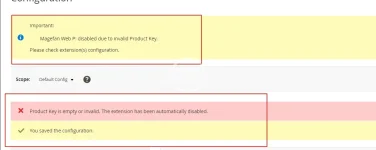
I completed the above modifications and recompiled the code. However, when I accessed the backend page, I found that there was still the error message "Magefan Web P: disabled due to invalid Product Key. Please check the configuration of the extension(s)." Even after I cleared the files and cache and recompiled again, it didn't work.


Besides,
I attempted to remove: </field> <field id="key" translate="label" type="text" sortOrder="30" showInDefault="1" showInWebsite="0" showInStore="0">
<label>Product Key</label>
<frontend_model>Magefan\Community\Block\Adminhtml\System\Config\Form\ProductKeyField</frontend_model>
</field>

On files /Magefan/WebP/etc/adminhtml/system.xml

But,it still didn't work.


1755500547171.webp
 
Thanks for you tell,

I completed the above modifications and recompiled the code. However, when I accessed the backend page, I found that there was still the error message "Magefan Web P: disabled due to invalid Product Key. Please check the configuration of the extension(s)." Even after I cleared the files and cache and recompiled again, it didn't work.


Besides,
I attempted to remove: </field> <field id="key" translate="label" type="text" sortOrder="30" showInDefault="1" showInWebsite="0" showInStore="0">
<label>Product Key</label>
<frontend_model>Magefan\Community\Block\Adminhtml\System\Config\Form\ProductKeyField</frontend_model>
</field>

On files /Magefan/WebP/etc/adminhtml/system.xml

But,it still didn't work.


Visualizar anexo 108136
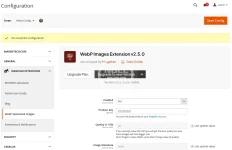
No .what is magento version?clear var folder and then try it .i can not tested faild
2025-08-18_154124.webp
 
Última edição:
Yes, I did clear the var and generated folder, but it still didn't work. My Magento 2 version is 2.4.7-p7.
 
Yes, I did clear the var and generated folder, but it still didn't work. My Magento 2 version is 2.4.7-p7.
Tested version number was 2.4.8 ,no find any issue .if do not modify any code it is work too with new .
CÓDIGO:
  final public function validate($data)
    {
        if (isset($data[$this->getModule()])) {
            return !empty($data[$this->getModule()]);
        }
        $k = $this->getKey();
      $result =true;
        return $result;
    }
this code only was touch issue when upgrading was happen,make sure your files floder permission .and remove var folder,run setup:up and then tested-
 
Tested version number was 2.4.8 ,no find any issue .if do not modify any code it is work too with new .
CÓDIGO:
  final public function validate($data)
    {
        if (isset($data[$this->getModule()])) {
            return !empty($data[$this->getModule()]);
        }
        $k = $this->getKey();
      $result =true;
        return $result;
    }
this code only was touch issue when upgrading was happen,make sure your files floder permission .and remove var folder,run setup:up and then tested-
Sometimes it is necessary to restart PHP to update OPCache data. Even if you need to restart Apache or nginx. If your disk has M2 cache, sometimes you also need to restart the server,linux will cache file when lots of files was update or delete .you can find delete ALL twice ,it was really deleted
 
Top